Find the Bug!
About this lesson, for parents and teachers
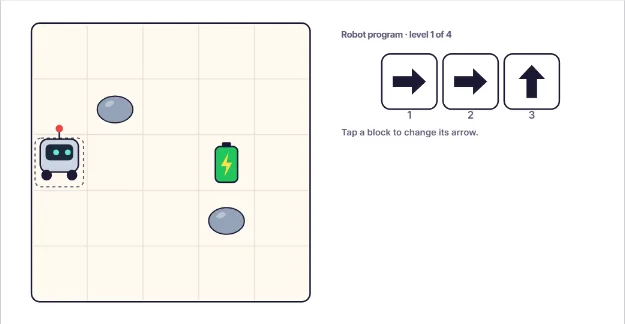
This robot is hungry for its battery, but somebody made a mistake in its program. Can you find the bug and fix it?
Ages 6–8 · about 6 minutes · builds on Loops Make a Dance
Try this
- Press Run and watch the robot follow its arrows. Does it reach the battery?
- Press Step to run just one block at a time. The glowing block is the one running now.
- Tap the block you think is wrong to turn its arrow, then run the program again.
- Fix all four robots. If you are stuck, press Hint.
How it works
A bug is a mistake in a program. The computer does not know it is a mistake. It does exactly what each block says, one block after another. So if one arrow points the wrong way, the robot goes the wrong way, even if every other block is perfect. Bugs are normal.
Finding and fixing bugs is called debugging. Good debuggers do not guess. They run the program and watch closely. The numbered dots on the board show where the robot was after each step, so you can match each dot to a block in the program. Look for the first dot that is in the wrong place. The block with that number is a great place to start looking.
The Step button is a real debugging trick. Programmers use tools that pause a program and run one line at a time, so they can see the exact moment things go wrong. When the robot bumps a rock, the bad step is often that block, but sometimes the real bug happened earlier and only shows up later.
After you change a block, always run the whole program again to test it. Fixing one thing can sometimes break another, and testing is how you know the fix really works. Real programmers say a program is not finished until it has been tested. Every time you press Run after a change, you are testing your fix, just like they do.
Where engineers use this
Every app and game you use was debugged. Software engineers use debuggers that pause programs step by step, exactly like the Step button here.
Words to know
- Bug
- A mistake in a program that makes it do the wrong thing.
- Debugging
- Finding a bug and fixing it.
- Step
- Running a program one instruction at a time so you can watch what each one does.
- Test
- Running a program to check that it does what you wanted.
Talk about it
Goal: Run a robot's program, watch where it goes wrong, and fix the one bad step.
- When the robot bumped a rock, was the bug always the block that bumped?
- Why is it smart to run the program again after you fix it?
- Can you think of a time you found and fixed a mistake in a recipe, a drawing or a game?
Without a screen: Draw a 5 by 5 grid on paper and put a toy on one square and a treat on another. Write an arrow program on sticky notes with one wrong arrow on purpose. Your child walks the toy through the program, finds the bad note and swaps it. Then let them write a buggy program for you to fix.
Curriculum links: CSTA K-12 1A-AP-14 (debug errors in an algorithm or program); CSTA K-12 1A-AP-10 (programs with sequences)
Questions
What is a bug in coding?
A bug is a mistake in a program that makes it behave in a way you did not want. The word became popular after engineers in 1947 found a real moth stuck inside a computer, though people had used it for machine faults even before that.
How do you teach debugging to kids?
Give them a short program with exactly one mistake and ask them to run it, watch, and point to where it went wrong. Stepping through one instruction at a time helps them connect each block to what happens.
Is debugging part of coding?
Yes. Professional programmers spend a large part of their time testing and debugging. Learning to stay calm and look for the mistake step by step is one of the most useful coding skills.