When Clicked: Events
About this lesson, for parents and teachers
Some programs just sit there, waiting and listening. Then you click, and something happens! Let's build a program that waits for clicks.
Ages 6–8 · about 5 minutes · builds on Loops Make a Dance
Try this
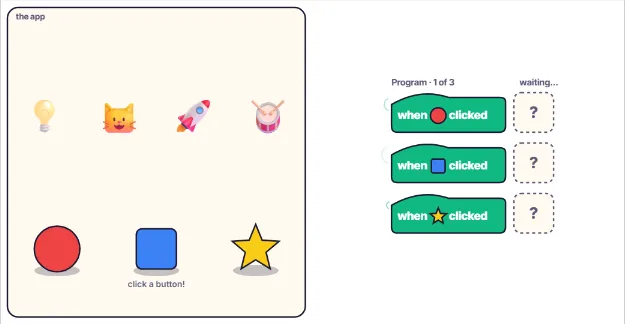
- Tap the box next to a when clicked block to choose what it does: the lamp, the cat, the rocket or the drum.
- Click the matching button down in the app to test your program.
- Watch the dot travel from the button to the block. That is the event arriving!
- In the last round, give one click two actions.
How it works
An event is something that happens, like a click, a tap, a key press or a timer going off. Many programs are built to wait for events. They sit quietly, listening, and only do something when an event arrives. Your own body works a bit like this too. You do not jump until someone says go, and the word go is the event.
A when clicked block is called an event handler. It says: when this event happens, run these actions. The actions do not run when you build the block. They run later, every time the event happens, as many times as you click. You can click the same button again and again, and the handler runs every single time, without you writing it twice.
If an event has no handler, nothing happens. That is why clicking a button with an empty block does nothing at all. The program heard the click, but nobody told it what to do. Programmers call an empty handler a missing handler. The event still happens, but nothing is listening for it, so the program quietly carries on waiting.
One event can start many actions, like playing the drum and lighting the lamp with a single click. And different events can start different actions at different times. This is how buttons, games and apps work: the program waits, you do something, and the program answers. Next time you tap an app, think about the event handler waiting inside it.
Where engineers use this
Every button on a website, every tap in a phone app and every key press in a game is an event, and programmers write event handlers to decide what happens next.
Words to know
- Event
- Something that happens that a program can notice, like a click or a key press.
- Event handler
- The block of code that runs when an event happens.
- Trigger
- To make something start. A click triggers the handler.
Talk about it
Goal: Connect buttons to actions and learn that programs wait for events like a click.
- What events does a TV remote listen for? What action does each button start?
- Why did nothing happen when a button had an empty block?
- Can you think of an event in real life, like a doorbell? What is the action?
Without a screen: Make three paper buttons in different colours. Your child writes a rule card for each one (when red is pressed, clap twice). Then you press the buttons in any order and they must do the matching action, and only when a button is pressed. Swap roles so you are the program.
Curriculum links: CSTA K-12 1A-AP-10 (develop programs with sequences and simple loops, to express ideas or address a problem); ScratchJr and Scratch event blocks
Questions
What is an event in coding?
An event is something that happens while a program is running, such as a mouse click, a screen tap or a key press. The program can listen for events and run code when they happen.
What does the when clicked block do in Scratch?
It is an event block. The blocks attached under it do not run straight away. They run each time someone clicks the sprite or the green flag the block is listening to.
What is event-driven programming for kids?
It means the program is built around events. Instead of running from top to bottom and stopping, it waits for clicks and taps and responds to each one. Most apps and games work this way.