How Image Filters Find Edges
About this lesson, for parents and teachers
Every photo filter on your phone, and every AI that recognises faces, starts with the same trick: a tiny 3 by 3 grid of numbers sliding over a picture. Load a kernel, press Apply, and watch the picture transform pixel by pixel.
Ages 12–14 · about 8 minutes · builds on Pictures Are Made of Pixels
Try this
- Tap Blur, then Apply. Watch the purple window slide and the output fill in.
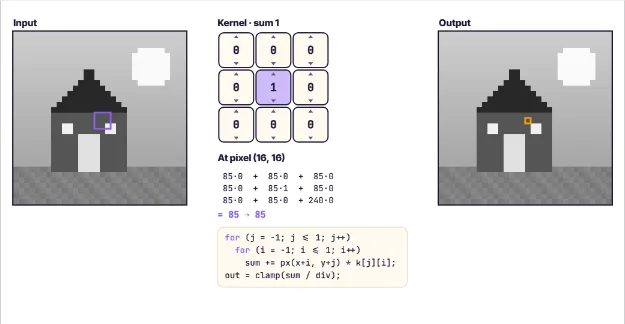
- Drag on the input picture to inspect any pixel. The maths shows all 9 multiplications.
- Load Edges or Sobel and apply it. Where does the output light up?
- Tap the top or bottom of a kernel cell to raise or lower its weight. Make the weights add up to 0, then Apply your own filter.
How it works
A grayscale picture is a grid of numbers: 0 is black, 255 is white. Our picture is 32 by 32 pixels, generated by code. A kernel is a small grid of weights, here 3 by 3. Convolution means: put the kernel over a pixel and its 8 neighbours, multiply each pixel by the weight on top of it, and add up the 9 results. That sum becomes the output pixel. Then slide one pixel over and repeat, 1,024 times.
The weights decide what the filter does. If all 9 weights are 1 and we divide by 9, each output pixel is the average of its neighbourhood, so sharp details smear out: a blur. A sharpen kernel has a big positive centre and negative neighbours, which exaggerates differences between a pixel and its surroundings.
Now look at a kernel whose weights add up to zero, like Edges (8 in the middle, -1 around it). On a flat area where all 9 pixels are the same, the positives and negatives cancel out to 0, which is black. Only where brightness changes, at an edge, is there something left over. The Sobel kernel only responds to left-right changes, so it finds vertical edges.
Negative sums are possible with these kernels, so this lesson shows the size of the result, |sum|, and clamps everything into 0 to 255. Pixels at the border reuse their nearest neighbour. Convolutional neural networks use exactly this operation, except they learn their kernel weights from data, discovering edge detectors on their own in their first layer.
Where engineers use this
Photo apps use convolution for blur, sharpen and portrait effects. Self-driving cars, medical scanners and face unlock use convolutional neural networks, which stack thousands of learned kernels to recognise objects.
Words to know
- Pixel
- One tiny square of a picture, stored as a number for its brightness or colour.
- Kernel
- A small grid of weights that slides over an image to filter it.
- Convolution
- Multiplying each pixel's neighbourhood by a kernel and adding the results to make a new image.
- Edge detection
- Finding places in an image where brightness changes sharply, usually object outlines.
Talk about it
Goal: Slide a 3x3 kernel over a picture to blur it, sharpen it, or find its edges.
- Why does a kernel whose weights add up to zero turn flat areas black?
- What do you think a kernel with only a 1 in the top-left corner would do?
- How might finding edges help a computer recognise a cat or a stop sign?
Without a screen: On graph paper, colour a simple shape and write a brightness number (0 to 9) in each square. Cut a 3 by 3 window out of card, write weights around it, slide it over the grid and compute the new number for each square on a second sheet. Compare the averaging kernel with an edge kernel.
Curriculum links: CSTA K-12 2-DA-07 (represent data in multiple ways), 3A-DA-12 (computational models), 3B-AP-08 (artificial intelligence); AI4K12 Big Idea 1 (Perception); Common Core 7.EE (expressions with negative numbers)
Questions
What is convolution in image processing?
Convolution slides a small grid of weights, called a kernel, across an image. At each pixel it multiplies the neighbourhood by the weights and adds them up, producing a new filtered image.
How does edge detection work?
Edge kernels have weights that add up to zero, so flat areas cancel out to black. Where the brightness changes sharply, the sum is large, which makes outlines light up.
What does convolution have to do with AI?
Convolutional neural networks, used for recognising images, are built from many layers of convolutions. Instead of a person choosing the kernel weights, the network learns them from thousands of example pictures.