Pictures Are Made of Pixels
About this lesson, for parents and teachers
Look really, really closely at a screen and you will find a secret: every picture is made of tiny coloured squares. Let's paint with them!
Ages 6–8 · about 6 minutes · builds on Counting With Light Bulbs: Binary · leads to Shrinking Pictures: Compression, How Image Filters Find Edges
Try this
- Pick a colour, then tap or drag on the big grid to paint squares.
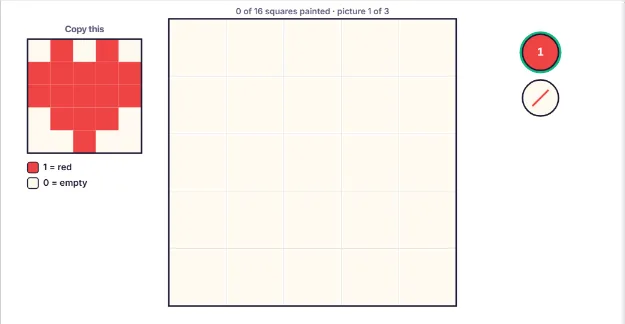
- Copy the little picture. When every square matches, watch your picture shrink.
- Press Computer view to see the number the computer stores for each square.
- In the last picture you only get numbers. Paint the house from the numbers alone!
How it works
A pixel is one tiny square of colour. The word comes from picture element. Every screen, from a phone to a TV, is a grid of pixels in rows and columns. Each pixel can only show one colour at a time, but put enough of them together and you see a picture.
Your heart was 5 pixels wide and 5 pixels tall, so it had 5 times 5, which is 25 pixels. When the picture shrank, the squares got so small that your eyes stopped seeing the edges. That is the trick every screen uses. A phone screen has millions of pixels, each one far too small to see.
A computer can't store a colour the way paint does. It stores a number for each pixel. In this lesson 1 means red, 2 means yellow and 3 means blue. The list of numbers row by row is the picture. Real computers use bigger numbers so they can show millions of different colours.
More pixels means more detail. A picture with only a few pixels looks blocky, like your heart. The number of pixels in a picture is called its resolution. A tiny icon on a phone might be 100 by 100 pixels, while a big TV picture has millions. Try counting how many pixels your house picture had: 6 rows of 6.
Where engineers use this
Digital cameras count their pixels in megapixels (millions of pixels), and game artists still draw retro pixel art one square at a time.
Words to know
- Pixel
- One tiny square of colour on a screen or in a digital picture.
- Grid
- Rows and columns of squares, like a chessboard.
- Resolution
- How many pixels a picture has. More pixels means more detail.
Talk about it
Goal: Paint a picture square by square and see how screens show images with tiny pixels.
- If a picture is 10 pixels wide and 10 pixels tall, how many pixels does it have?
- Why do you think the heart looked blocky up close but smooth when it was small?
- Can you find pixels if you look at a screen through a magnifying glass or a drop of water?
Without a screen: Draw a 6 by 6 grid on squared paper. Write numbers in it (0 for blank, 1 for one colour, 2 for another) and swap grids with your child: each of you colours in the other's picture from the numbers only. This is how a computer sends a picture as numbers.
Curriculum links: CSTA K-12 1A-DA-05 (store, copy, search, retrieve, modify and delete information using a computing device, and define the information stored as data); CS Unplugged image representation
Questions
What is a pixel in simple words?
A pixel is one small square of colour. Screens and digital photos are made of thousands or millions of pixels arranged in a grid.
How do screens make pictures?
A screen lights up each of its pixels in a colour. The pixels are so tiny and close together that our eyes blend them into one smooth picture.
How does a computer store a picture?
It stores a number for every pixel, saying which colour that pixel should be. A picture file is a long list of those numbers, row by row.