Find the Way Through the Maze
About this lesson, for parents and teachers
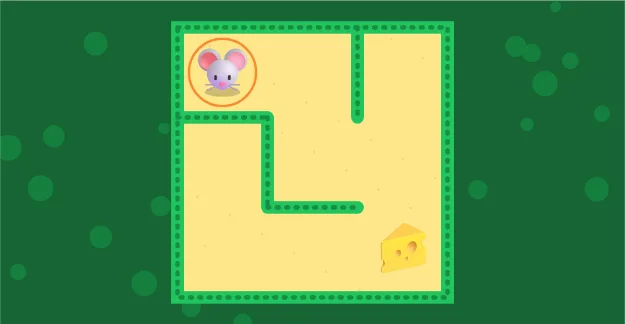
A hungry little mouse is at the start of a hedge maze, and the cheese is far away. Can you show the mouse the way?
Ages 3–5 · about 5 minutes · builds on Robot Steps to the Apple · leads to Shortest Path on a Map
Try this
- Put your finger on the mouse and slide along the yellow path. You can also tap the next square.
- The green hedges are walls. The mouse cannot go through them.
- If you reach a dead end, slide back the way you came and try another path.
- Stuck? Press Show me to see sparkly dots along the way.
How it works
A maze is a puzzle made of paths and walls. Some paths lead to the end, and some stop at a dead end, a spot with no way forward. When we hit a dead end, we do not give up. We go back to the last place where the path split, and try a different way. Grown-ups call this backtracking.
Every maze in this game is new. The computer builds it with a real recipe: it starts at one square and digs a tunnel to a random neighbor, again and again, and when it gets stuck it backs up and digs somewhere else. That recipe always makes a maze with exactly one way from the mouse to the cheese, plus a few dead ends to explore.
Finding a way is something computers do all the time. When you press Show me, the game uses a method called breadth-first search: it checks every square one step away, then two steps away, then three, until it reaches the cheese. Maps apps use ideas like this to find the way to a park, and robots use them to find a path around a room.
Where engineers use this
Map apps search a giant maze of roads to find the quickest way to a place, and robot vacuums plan paths around furniture. Video game characters find their way with path-finding too.
Words to know
- Path
- A way you can walk from one place to another.
- Dead end
- A path that stops, so you have to turn around.
- Go back
- Return to where the path split and try another way. Computer people call it backtracking.
Talk about it
Goal: Trace a path from start to finish and learn that some paths are dead ends.
- What did you do when the mouse got to a dead end?
- How did you know which way to try next?
- Can you find the way from your bed to the front door with your eyes closed, saying each turn?
Without a screen: Build a maze in the living room with couch cushions, chairs and blankets, with one or two dead ends. Hide a snack at the end. Let your child crawl through, then let them rearrange the cushions to make a maze for you.
Curriculum links: Early foundation for CSTA 1A-AP-08 (following and creating step-by-step algorithms) and 1A-AP-14 (finding and fixing a wrong path); supports spatial reasoning and problem-solving goals in pre-K frameworks.
Questions
Are mazes good for preschoolers?
Yes. Simple mazes build planning, patience, spatial thinking and hand control. Wide paths and a friendly goal make them fun for 3 to 5 year olds.
How do I help my child solve a maze?
Encourage them to follow the path with a finger, stop at each fork, and look ahead. If they hit a dead end, praise them for noticing and help them go back to the last fork.
What do mazes have to do with computers?
Computers solve maze-like problems all the time, like finding a route on a map. They use search methods that explore paths step by step and back up from dead ends, just like a child does.